
Frequently Asked Questions
WHAT IS APTITUDE INTERNET'S BILLING POLICY?
You can find our full billing policy by following the link below.
MY INTERNET STOPPED WORKING, WHAT DO I DO?
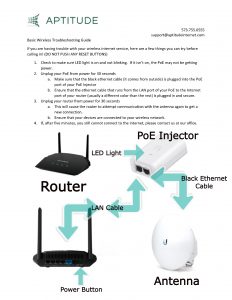
For Wireless Internet Customers:
Here is a basic guide for you to refresh your internet connection. If this does not solve your problem, call in to our tech support line at 573-755-0555 or email us at [email protected].
For Fiber Internet Customers:
Power Cycling your router should help resolve a service issue in addition to help restore your service after an outage.
Learn how to Power Cycle your router & Power Adapter
Turning your router off and on solves most connection issues:
1. Ensure PoE and Wireless router are plugged into power and ethernet cables are plugged in correctly
2. Unplug the power adapter for your cpe and your wireless router from the electrical source
3. Wait One Minute
4. Plug Your Equipment Back In
5. Attempt to Connect to the Internet
6. Report an Outage or Contact Support if still experiencing issues
HOW DOES THE WEATHER AFFECT THE SERVICE?
Aptitude accounts for adverse weather conditions in all installations. Your connection will always be strong and reliable, even in driving rain, heavy snow, high winds, and scorching heat.
We are always proactively upgrading and strengthening our network to ensure that you always have the best service possible. This includes linking our towers together using Fiber-Optic cable to take weather out of the equation altogether.
IS THERE A CONTRACT?
No!
At Aptitude Internet, we do not lock our subscribers in lengthy contracts! We do offer several different services, which have different download and upload speeds.
Our services are on a month-to-month basis and you can cancel, or hibernate your service at any time.
Click here to view our Terms of Service.
HOW MANY COMPUTERS CAN I CONNECT?
As many as you want! There is no limit to the number of computers you can hook up. A wireless router is the simplest way to connect more than one device to your home network.
Bandwidth is shared between all devices in your network, so as you add more devices we recommend considering one of our higher services, especially if you plan on using your connection for streaming tv, games, or work.
DOES APTITUDE HAVE DAILY OR MONTHLY DOWNLOAD CAPS/LIMITS?
Never!
Browse the internet, stream movies and music, and download as much as you like without worrying about overage charges.
Aptitude Internet is one of the few providers who offer a truly unlimited internet service. While some providers advertise ‘unlimited data’, they slow your connection after a certain amount of data used.
At Aptitude Internet, we never slow you down, cut you off, or charge you extra based on how much you stream, play, or work.
WHAT IS INCLUDED IN THE INSTALLATION?
Our Standard Installation includes most antenna mounts or outdoor boxes, the antenna or fiber equipment and cabling to your wireless router or home network.
During installation, our technician will determine the location of the antenna and equipment in order to ensure the best service possible.
Some installations require custom solutions for the highest quality of service. Our technicians will always discuss this with you before beginning any work.
WHEN WILL SERVICE BE AVAILABLE IN MY AREA?
If you live in an area highlighted yellow on our coverage map it means service is coming soon to your area. Coming soon areas can be in the planning or construction phase, but if you sign up on the Early Bird List you’ll be notified when it’s available to be installed at your address. There is no commitment when signing up on the Early Bird List, but it can make you eligible for a free install.
What is the Install Process?
When you submit your information:
1
Submit Your Information
Complete the form below and our team will review your address and service availability.
2
Schedule & Install Your Fiber Drop
Before service can be activated, a fiber line must be installed from the Aptitude Internet network to a weatherproof box outside your home. Our team will contact you to schedule this work, which may be completed underground or above ground depending on your property.
3
Schedule Your Installation
Once your fiber drop is complete, we'll contact you to schedule your installation appointment.
4
Get Connected
We'll install your equipment, activate your service, and get you connected to the Aptitude Internet fiber network.